Technical aspects of Boggle
1. The report at the end of the game
There was a time when playing against the computer was a challenge; however those days are gone forever! An average present-day computer based on a Pentium IV @2 GHz is capable of finding all words hidden in a lattice in a timeframe of 2 to 3 seconds.
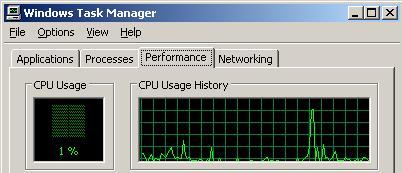
Behind the screens, Boggle is a multitasking program with 2 parallel tasks. In the foreground the game is active while a back ground task is searching for all hidden words inside the shown lattice. By starting the task manager, it is easy to recognize the extra CPU power, which is used by the Boggle program just after starting the boggle game.
As soon as a Boggle game is started, the CPU power increases rapidly but after about 3 seconds the consumption of CPU returns to normal:
Start of the Boggle game
As soon as the game is terminated, the background task will show a list with all words which are hidden in the lattice.
Today the challenge for the player is trying to obtain the highest possible percentage of found words. The computer keeps track of the obtained percentages in different games and stores the best scores in a list with all high scores and hence it is up to the player to try to increase his high score and obtain a better score in the next game.
In case you play on a very old computer and the game is aborted quickly, it may happen that the computer cannot create the complete list. At the end of the result list Boggle will indicate whether the list is partial or complete.
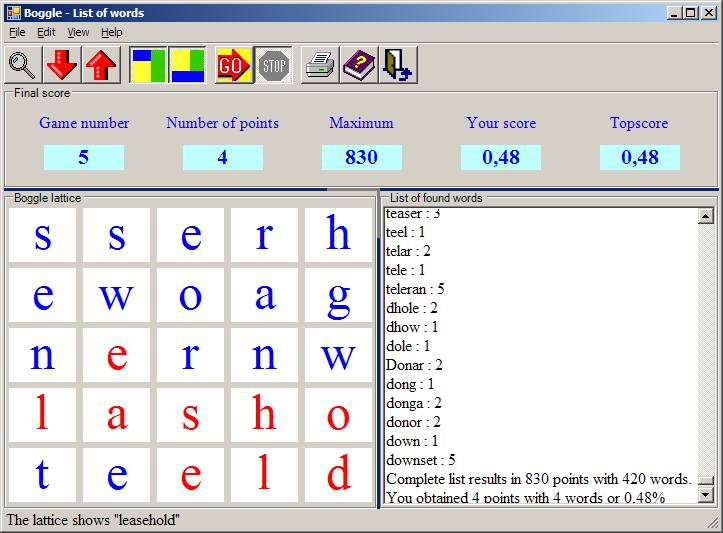
This list can be looked at on the screen, the list can be printed or it can be stored on the hard disk.
In order to print the list, select “File’ – ‘Print’. To store the file on the hard disk, select “File” – “Save as”.
You can select the report either completely or partly and copy the selected text to the clipboard by pressing the key combination 'CTRL – C'. In any Windows program you can subsequently recall the copied text by selecting 'paste' or via the key combination 'CTRL – V'.
1. The lists with the valid words
During the installation of the Boggle program a folder c:\Program files\Proton\Boggle gets created. Within this folder a number of subfolders are created for each language in which the game can be played. In these subfolders a number of files are found containing all valid words for the given language. These lists are conventional ASCII-texts which can be edited using programs like Microsoft Notepad. By editing these files more valid words like names of place scan be added. Once added the Boggle game will treat them as valid words.
Furthermore the English subfolder named ‘en’ contains this help text as a .chm file.
2. The Boggle CD
After the installation of the Boggle program will contain a folder ‘c:\Program files\Proton\Boggle’ . In this directory all files to play the boggle game are installed and on top of those files two extra word documents are added:
o CDSheet.doc: This document can be printed on a ‘stick-on CD label’.
o Cdlabel.doc: This document can be printed on a sheet of paper and be cut out as a CD cover.
The CD can be create by downloading the setup file from the website: http://home.deds.nl/~andrevanassche
The ‘MSI’ setup file contains the complete installation program.
3. List of the high scores
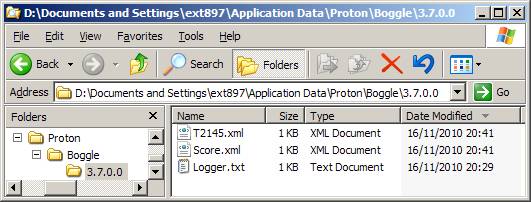
All scores are being stored inside an XML file. All general scores are saved in a file named ‘Score.xml’. Today’s score is stored in a file with the date included in the filename using the format: T<number>.xml.
The <number> is the number of days since January 1, 2005. Old files of this type may be removed from the computer by the administrator. .
When playing around Midnight, the Boggle program will automatically save the scores of the previous day and subsequently it will create a new file holding the score of the brand new day.
The creation is done on the moment the game terminates. In case no valid game (at least 1 point must be obtained) is played on a day the corresponding score file will not be created.
The score file is typically stored in the personal application folder, which depending on the used operating system can reside at:
D:\Documents and Settings\<your name>\Application Data\Proton\Boggle\4.0.0.0
Or
C:\Users\<your name>\Application Data\Proton\Boggle\4.0.0.0
4. XML file containing program settings
The settings of the Boggle program are also stored in XML files. During the startup of the Boggle game, a welcome screen is displayed. While this screen is visible the XML file with the settings is read. . In case an error occurs during the XML reading, a dialog box with the error message will appear and all settings will return to the default value. In the given case these default settings will be saved when the Boggle program is exited. However in the mean time the Boggle will correctly work using these default settings unless they are immediately changed by the player.
In case the program has no rights to save XML files on the hard disk, the program will raise an error message each time it attempts to write the score files. However as writing is impossible, the scores and the program settings will not be saved and are lost forever.
The program needs the rights to write on the personal folder which is depending on the used operating system typically stored at:
D:\Documents and Settings\<your name>\Local Settings\Application Data\Proton\Boggle\4.0.0.0
Or
C:\Users\<your name>\Local Settings\Application Data\Proton\Boggle\4.0.0.0