I2CW_32, version 2a


Contents:

I2Cw-32
ni driver info
description  I2Cw-32
contents of I2Cw-32
license / conditions of use


version I2CW_32    "2a" 
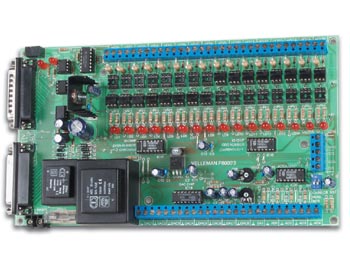
Velleman K8000 driven by LabVIEW version 2a
   
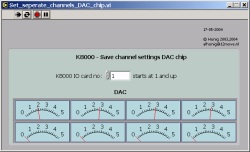
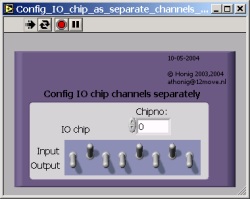
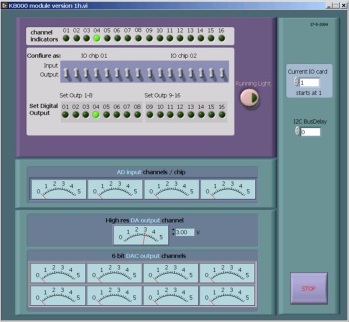
This version (November 2005) is debugged and all IO, AD DA and DAC's etc. is tested. Bugs from the previous version are removed. The front panel is still the same: You can use this panel as a control panel or use it as a starting point. You can configure IO using handy toggle switches. DA is controlled by V-meters. AD is also indicated V-meter style.

The vi's also import and or export these new indicators so you don't always have to look them up in data-array's. Just calling the applied vi is sufficient in a lot of cases.
Of course you can expand this functionality if you like, the drivers are freeware.

Where the former version was still using the LabVIEW library structure (llb), I now choose to use a map / submap structure. This way of working prevents loosing all your precious work in a split second when a possible LabVIEW crash occurs. It is also easier to structure since some functions are common for several k800x pcb, and some are specific.  

 If you have useful contributions or suggestions; please let me know!

If you want more information about LabVIEW www.ni.com is the place to be.
If you want more information about the K8000 interface please visit www.velleman.be

The best place for the 'out of the ordinary' support is the user group for K8000

I2CW_32 version 2a         &    I2CW_32mot version 1h


I2CW_32 LabVIEW driver
Velleman supplies the K8000 with self explaining software in Visual Basic, C and Pascal.

The driver on this page this Velleman 'driver' but written in LabVIEW. It has the same subroutines (vi's) and differs as little as possible.
This way you easily translate your own programs to LabVIEW and if you are familiar with the Velleman drivers, you will have no problem with this one.

I2CW_32 is a full translation of the Velleman I2CW_32.bas module supplied with the K8000.
I2CW_32mot is a full translation of the Velleman I2CW_32mot.bas module supplied with the K8005.

LabVIEW has a few advantages over other programming languages when it comes to process control. It is very easy at handling array and variable structures. That's why I made some changes and added a few vi's that are not in the Velleman package. When changes are made in regular subroutines, they are documented. Some vi's have an extra, they in and export chip control and settings directly. Also a couple of new vi's are added. They contain a 'çhip' amount of IO that you program either I or O in one go.

The drivers for mot are written using LabVIEW 6.02, the drivers for K8000 are written using LabVIEW 7.1, both for use on the Windows  XP Platform.
I2CW_32 and I2CW_32mot.llb are  there solely for use together with the Velleman K8000 computer interface board and in combination with the K8005 stepper card.


The K8000 and associates use the Philips I2C protocol to communicate. You can find lots of information about it searching the web.
 
To use K8000 with LabVIEW on W2000 you need new ni-drivers


Learn more


To use K8000 with LabVIEW <  7.0 on W2000 you need new ni-drivers

Since I wanted the software to run on Windows 2000 I had to tackle some extra problems. The parallel port, used by the K8000, is not addressed direct to under W-2000 and W-xp. LabVIEW 6i or 6.02 is standard not capable of writing directly to the parallel port when running Windows 2000 (& NT and XP as far as I know). If you own 6i you can freely upgrade to 6.02 on the ni website. You better do so in this case. I had some difficulty with 6i.

LabVIEW needs the InPort and Outport functions. Check out ni for information if your version of LabVIEW doesn't seem to have them. If you start using the I2CW you will notice that these vi's are already incorporated in I2CW.
Furthermore you'll need some extra driver software from ni that support InPort and OutPort under 2000 and XP.
check ni for them. Again; InPort and OutPort are included in the I2CW_32 and I2CW_32 program. (courtesy of ni Netherlands)


On the NI website you can freely download the updated vi's and drivers needed to solve this problem. The standard vi's needed for I2CW_32 are included in the program so you have less (no) problems integrating them.
You will also need to download AccessHW.zip (for the vi's) and cvirt551.zip (new CVIRTE.DLL) for I2CW_32 and I2CW_32 to function well.

They are available from the NI website Though they are very hard to find on the NI website they are there.

I do not post a deeplink, but this is were I found them.

For more information just search at www.ni.com


> NI Developer Zone
  > Development Library
    > Measurement and Automation Software
      > LabVIEW >Development System
        > Hardware Input and Output
          > Serial
             Download AccessHW.zip
> In the main window search 'complete site' for 'CVI 5.5.1'
  > search / select relevant finding
    > Download cvirt551.zip

The newest driver I2CW_32 v2a does not need AccessHW  and cvirt any more. It uses the InPort and Outport that are supplied with LabVIEW 7.1


Learn more about I2Cw_32
I made the LabVIEW vi's look as close as possible look at the Visual Basic subroutines.
 This makes it easier to understand what's done there.


Furthermore I tried to give the subroutines / vi's an as logical icon as I could think of.

LabVIEW, with it's own functionality sometimes has standard functionality that is not available in VB.
Some functions, like DecToBin, Shift Bit Left and Invert Binary are more or less standard functions within LabVIEW so you don't really need subroutine's there. Some functions are offered in LabVIEW but behave differently. They still have to be 'simulated'.
People familiar to LabVIEW may easily replace the replaceable subroutines with LabVIEW objects. For people
relatively new to LabVIEW it is probably easier this way.
If you are going to use this program and you find easier ways to accomplish things; go ahead and change what you like.


I have tested all functions, but are not using all of them myself so it is still possible that there are still minor bugs present. If you encounter a problem don't hesitate to contact me.


note that:
It is striking that LabVIEW seems very slow and that the tools supplied in the original VBdriver to slow down the process are not very useful using LabVIEW. LabVIEW is slow enough itself, so the timer setting in the driver will have to be set close to zero otherwise your machine will appear to be stalled.

note that:

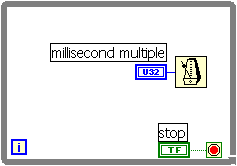
LabVIEW on NT based platforms has a strange 'bug' when using while loops. You hàve to slow them down by a 'wait for a (10) millisecond multiple) otherwise your machine will stall. You can easily test this by creating an empty 'while loop' with just a timedelay and an attached control. Start task manager and set the performance tab. When your delay is approaching 0, LabVIEW it is using up all processor time.


Contents of I2Cw_32 version 2a


about the subroutine's / vi's
o K8000 module is a fully functional vi included in I2CW_32 to demonstrate and test IO, DA DAC and AD.

vi's report AD in common vu meter fashion.
Also DAC's are set vu-meter fashion.

IO is configured using switches, so all is clear to understand and program.

as in the first version:
o Init_K8000 is a replacement of the original I2C_Init. It also incorporates the Sub main() and the global declaration from the VBversion (and in the case of LabVIEW the initialization of the array's)
o Select_I2C_printerport is an 'interactive' vi that checks for the parallel port address by writing and reading to the supposed address and comparing the results.
o DecTo7Seg is skipped
o DecToHex$ is skipped

o program structure now is:

   main map
        
a      K8000
                        
a   globals k8000
                        
a   k8000 vi's
        
a      K8005
                       
a    globals k8000
                       
a    k8000 vi's
        
a      support
                       
a    globals k800x (shared)
                       
a    shared vi's


Contents of I2Cw_32mot.llb
about the subroutine's / vi's
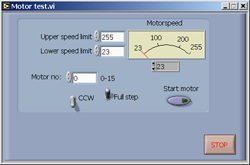
o K8005 test  is a small vi included in I2CW_32 to demonstrate and test IO.

o program structure now is:

   main map
        
a      K8000
                       
a    globals k8000
                       
a    k8000 vi's
        
a      K8005
                        
a   globals k8000
                        
a   k8000 vi's
         
a     support
                       
a  globals k800x (shared)
                       
a  shared vi's

Place the K8005 map in the same directory as where you placed K8000. K8005 does not contain any of the shared vi's. At this moment I2C vi's are considered as K8000 vi's instead of shared. To use K8005 you will also need the K8000 vi's.


** AccessHW.zip and cvirt551.zip are as far as I know by NI and credits go to NI. **
** Credits for I2CW_32.bas of course go to Velleman. **


 License / Conditions of use
  • I2CW_32 is freeware and others may not charge money for it.
  • You may change whatever you like in the I2CW_32 as long as you leave the original zip file unchanged.
  • No other files may be added.
  • You may not distribute any other new or changed zip with (more or less) the
    same contents as this one as being the same zip file as this one.
  • You may freely use this software but I take no responsibility for any damage
    direct or indirect resulting from the use of I2CW_32
  • If you find bugs, please let me know so I can then remove them in a later stage and
    incorporate the changes in a possible future version.


    At Honig
    August 02, 2007


last updated August 02, 2007