 |
 |
 |
 |
|||
|
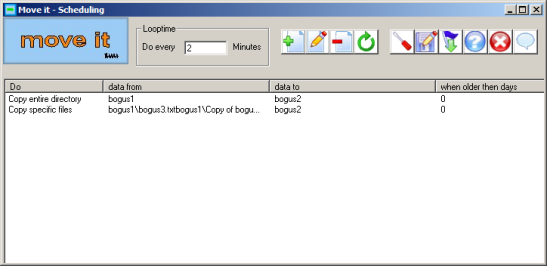
Move it! is a scheduling program. It moves, copy's or deletes separate files up to complete directories. It does these tasks running in the background task so you are not bothered by it. So if you are bored checking folders yourself, Move it is what you are looking for!
|
 Installing Move it Installing Move it |
|
|
How
does Move it work? |
|
|
Is
there a help file? |
|
|
Is
Move it finished? |
|
|
Why is
Move it free? |
|
|
Update
unformation |
|
| Installing Move it | |
| Move it comes as a zipped installer. Unzip it and run
the installer. That's it. A complete uninstall is integrated. |
|
| How does Move it work? | |
| If you want to learn more about Move it, please read the
online help
here. All working are explained there, as well in the help that comes along with Move it. |
|
| Is there a help file? | |
| Move it is accompanied by a standard format windows
help. You can make use of the online equivalent by clicking here. |
|
| Is Move it finished? | |
| Since this is the first version put on the web it is likely that we will add some additions or change some workings in the near future. | |
| Why is Move it free? | |
| I think that you know why. We do not all want to invest money in things we rarely use. But nevertheless some tools are really an outcome when you need them. And I felt like needing this. And why should everything be paid for? If you like this program and start to use it on a regular basis, help out someone in your vicinity. As the About suggests: If you have money to spare: how about helping the Salvation Army in helping the neighbour? | |
| Update information | |
| build 15, March 20 2006 *forgot to scale button positions for msg box case file not found. Corrected this *when move it interface was loaded and no changes were made, it could not go into hidden mode. Corrected this. *After run once with confirmation the move it gui went to the background when msg box disappears. Corrected this. Same for Add screen. *When running hidden and confirmation on the msg boxes would popup. this made Move it crash. Corrected this. *When the gui went to hidden anda new instance was launched the first was not detected. Corrected this. -- build 14, March 02 2006 This is the first version of Move it - Scheduling. Move it is the result of a wish of my own to have a simple program that could schedule file removal and do it for me as a background process. Maybe it stays as it is now, maybe I will post updates depending on the feedback I get. For now there is no commercial version. This version comes with a demo task installed. In the install directory are two maps: bogus1 and bogus2. Map bogus1 contains a dummyfile (bogus3) and a series of subfolders of which the last one also contains a dummy file. These are scheduled to be copied and moved to the bogus2 map You can of course remove this task. After removal of the task you can also remove the bogus maps. |
|